Continuing in the Python series, this tutorial will cover how to interact with user input and having some fun with math and numbers! We will build upon the previous tutorial Python 102… Everything Strings and work to combine strings with numbers. Let’s dive in!
This tutorial will touch upon the program we will build in the first video tutorial on YouTube. Interacting with users is crucial to building programs that take some input, whether it be strings, numbers, names, photos, etc. and doing something with it. For example, you can require a user to input their name, and then return a customized output message utilizing that input.
User Input
Getting input from users can be fairly simple, all you need to do is invoke the input() function. To do this, run the following command in the IDLE interactive window and press Enter:
>>> input()It appears nothing has happened, so what’s going on? If you take a look at the cursor, it has moved to a new line, but it left out the >>> to signify a Python line. This is because it’s waiting for the user – in this case you – to write and enter something. Enter some text and press Enter:
>>> input()
Interacting with Python!!
'Interacting with Python!!'
>>>
Once you hit Enter, your text appears on a new line, this time with single quotes surrounding it because input() will return a string with any text that was entered by the user.
This seems all well and good, but not very useful at the moment. There are many ways to use input() in a program, and one of those ways is to use a prompt of sorts. A prompt can be anything you wish to put before the input() function. For example, one way to use a prompt is to ask for the users name. Open IDLE’s editor window (or create a new file in the IDE of your choice) and type the following:
prompt = "What is your name? "
user_input = input(prompt)
print("What a pleasure to meet you, " + user_input + "!!!")
To run this in IDLE, press F5. You will see the text, What is your name? displayed on the interactive window side where the cursor is blinking. Note: we leave a blank space at the end of the prompt to separate the users input from the question mark at the end of the prompt. If you were to omit the space, you would begin to type right next to the question mark with no separation.
If you type a response after the prompt and press Enter, the response is then assigned to the variable user_input.
An example of running this program could be the following:
What is your name? Gabriella
What a pleasure to meet you, Gabriella!!!
Saving input from a user to a variable can be extremely helpful in programs and you can do countless different things with this input. For example, you can remove whitespace, lowercase, uppercase, multiply numbers together, and plenty more.
There may be times where you will want to combine strings and numbers either with user input or independently. When using input() the output is always in the form of a string. In those cases where you want to do some calculations or use numbers, you will want the output to contain numbers instead of strings. To do this, you will need to convert the strings to number data types and vice versa.
Numbers and Strings
As we have seen in Python 102… Everything Strings, we can place pretty much whatever we want inside of a string. It is important to note that numbers inside of strings are not the same as actual numbers. To see this in action, type the following in IDLE’s interactive window:
>>> number = "7"
>>> number + number + number
'777'
Before we dive into what is happening above, let’s look at another example:
>>> number = "7654"
>>> number * 4
'7654765476547654'
In the first example, the + operator concatenates the three strings together to output ‘777’ instead of what we might expect, ’21’.
In the second example, number * 4 concatenates four different instances of the string “7654” instead of multiplying “7654” by four. The result is “7654765476547654” instead of 30,616.
This happens because of string concatenations. Python combines the strings “7654” + “7654” + “7654” + “7654” by concatenating each string one after the other. When you multiply a string by any integer n, you are really concatenating that string by n copies of that string.
Let’s determine what happens when we try to add a number and a string:

In this case, Python throws a TypeError because it requires you to use the same data type, in this case an integer on the other side of the + operator. In order to add these two things, we need to convert the string to a number since we can only add the same data type together.
Converting Strings to Numbers, and Numbers to Strings
It is very common, especially when working with user input, to try to combine different data types, but as we have seen in the previous error, type mismatches can lead to all types – pun fully intended – of problems.
In order to perform any sort of calculation on numbers contained in strings, we must first convert those strings to a number type. There are two very useful and intuitive functions to accomplish this, float() and int().
float(): stands for floating-point number, converts objects into numbers with decimals. Floating-point numbers always have at least one decimal place (of precision).
int(): stands for integer, converts objects into whole numbers.
Note: you would lose everything following the decimal point if you tried to convert a string that looks like a floating-point number into an integer.
Let’s look at a few examples. Type the following lines of code into the interactive window:
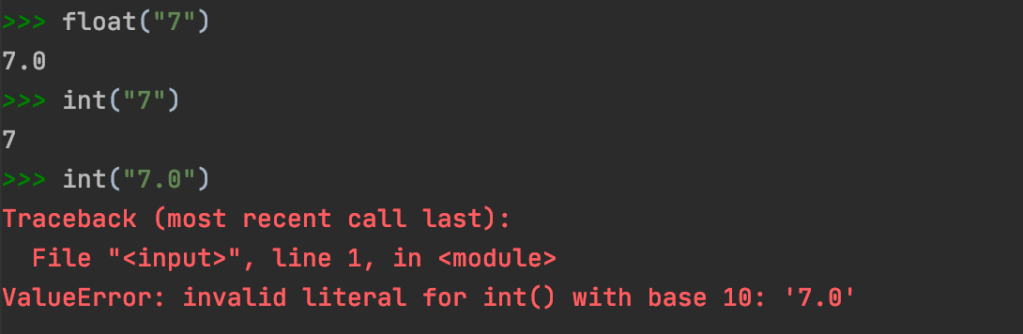
The reason Python throws an error when trying to convert a float to an integer is because it would result in the loss of precision.
Time to write a program! Type the following into the editor window:

Can you guess what the output will be when we input the number 5? As expected, the output is 555.
How can we fix this? You guessed it! We can convert number to a float and then multiply by 3.

Voila, with an input of 5, our output is now 15.
Now let’s figure out how to convert numbers to strings. Since we cannot concatenate a number with a string, we need another way of converting the two different data types to the same data type.
Take the following example:
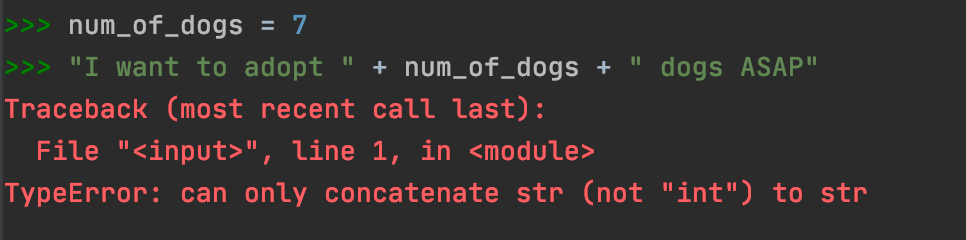
This example throws an error because we are trying to add two different data types together. To fix this, all we need to do is use the str() function to convert the variable that stores the number into a string. Once we convert the number to a string, we can then concatenate all string objects:

This is not the only use case for str(); str() can be used on a number literal and arithmetic expressions as in the following examples:


f-Strings:
f-Strings are a way to format strings in Python so it is easier to work with various data types. f-Strings stands for “formatted string literals”, which means they have an f at the very beginning of the line that is followed by curly braces that contain the expression within. Here are some simple examples using f-Strings:
>>> dog_name = "Jet"
>>> dog_age = 3
>>> f"My dog, {dog_name}, is {dog_age} years old"
'My dog, Jet, is 3 years old'
You could also use a capital F:
>>> F"My dog, {dog_name}, is {dog_age} years old"
'My dog, Jet, is 3 years old'
f-Strings make it extremely easy and clean to work with strings and other data types.
The possibilities for user input and numbers in your code are endless! Have fun exploring and stay curious!
 The G Code